For Claude Code power users · Windows

Keep your Claude agents working while you step away.

Run a whole fleet of Claude Code agents without babysitting them. HELM watches every session, approves the routine "Allow" prompts that freeze them, and sends only the risky calls (delete, send, publish, pay) to your phone. Nervous about a tool that clicks for you? Flip on Observe mode and watch it for an hour before it ever touches anything.

Windows + Claude Code (in Claude Desktop) · free to start · one-click, no Python
Claude Desktop Claude Code sessions Windows 10 / 11
↤ move your mouse to steer ↦
See it work

Frozen sessions, moving again — on their own.

This is HELM running. The routine prompts get approved in seconds. The irreversible always waits for you.

Claude Desktop · 4 agents⚓ HELM watching
auth-refactorAllow Claude to edit auth.ts?Approved · working
scrape-pipelineAllow Claude to run build.sh?Approved · working
prod-deployDelete the production table?→ sent to your phone
docs-writerAllow Claude to edit README?Approved · working

Routine prompts: approved in ~4s, even minimized. Delete · send · publish · pay → always you.

The problem

Your agents stop the second they need you.

You kick off five Claude sessions, walk away, and come back to find every one of them frozen on "Allow Claude to edit this file?" — waiting on a click you could have made in your sleep. The promise of autonomous agents dies on a permission dialog. HELM is the hand on the wheel that keeps them moving.

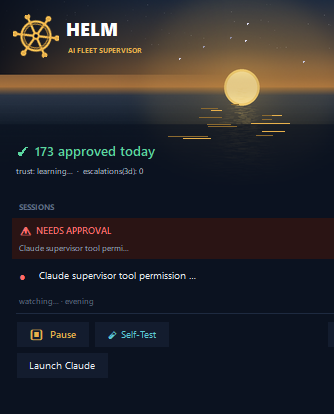
The HELM app showing live approvals
What it does

Everything it takes to run unattended.

HELM clicks the real buttons in Claude Desktop through Windows accessibility — no screen-scraping, no fake keystrokes, no runaway processes.

Auto-approves the routine

Permission prompts like "Allow Claude to edit X" get approved in about four seconds — for the session on screen and the ones running in the background.

🧭

Escalates the risk to your phone

Anything irreversible goes to Telegram with one-tap options. You decide; HELM applies it and remembers it for next time.

Revives stalled agents

A session that finishes and sits idle gets nudged to continue. Opt-in per session, rate-limited, and never your private chats.

📈

Learns your judgment

It scores its own accuracy against your choices and proposes new rules you accept with a tap. It needs you a little less every week.

🩺

Heals itself

A heartbeat + watchdog recover it from hangs, not just crashes. It self-tests every 20 minutes and pings you the moment anything degrades.

📱

Runs from your phone

Text it /status, /fleet, /pause, /resume. See every machine and what's waiting, from anywhere. Shrink it to a tiny strip when you don't need the panel.

The rules

Trust is the whole product.

An early version once spawned background processes and took a machine down. That mistake became a permanent, self-verified rule. Here is exactly what HELM will and won't do.

How it works

Four moves, on a loop.

Watch

Reads every live Claude session and what each is waiting on.

Decide

Routine → approve. Ambiguous → choose smartly. Risky → you.

Act

Clicks the real button. Verifies the session actually moved.

Report

Logs it, learns from it, shows it on your phone.

Pricing

Start free. Upgrade when it's saving you hours.

No subscription, no account, no telemetry. The free tier does the thing everyone wants. Pro unlocks the unattended-operator features.

HELM · Free
$0
The core, forever. No account.
  • Auto-approves routine permission & "continue" prompts — on every session.
  • Background sessions too, not just the one on screen.
  • Self-healing + the live status app.
  • Safety rules — never touches the irreversible.
Download free
FOUNDING
HELM · Pro · Lifetime
$39 once$59
Founding price for the first 100 buyers.
  • Everything in Free, plus:
  • Phone control & escalation — risky calls to your phone, one tap.
  • Stall revival — nudges stuck agents to continue.
  • Learning — proposes its own rules from your choices.
  • Fleet view across machines + smart decisions.
  • 3 machines · free v1 updates · email support.
⚓ Get Pro — $39
Questions

Straight answers.

Which AIs does it work with?

HELM is built specifically for Claude Desktop on Windows (including Claude Code sessions run inside it). It drives Claude's real interface, so it does not work with ChatGPT, Gemini, or other assistants today. If you live in Claude all day, it's built for exactly you.

Do I need to be a developer to install it?

No. The Windows download is a one-click HELM.exe — no Python, no setup wizard. Unzip it and double-click. You only need Windows 10/11 and Claude Desktop. (A source build is also available for developers who want to tinker.)

What's the difference between Free and Pro?

Free auto-approves the routine prompts that stall your sessions — the thing you came for. Pro ($39 once) adds the unattended-operator features: phone control & escalation, stall revival, learning that proposes its own rules, multi-machine fleet view, and smart decisions. Upgrade right inside the app.

Is it safe? Could it approve something destructive?

No. HELM never auto-approves irreversible actions — deleting, sending email, publishing, posting, or anything with payment always waits for your explicit approval. It only ever clicks a button that's actually on screen, and a built-in self-test verifies its safety rules every 20 minutes.

Does my data leave my computer?

No. HELM runs entirely on your PC. There's no cloud account and no telemetry. The optional phone control uses a Telegram bot you create and own.

Does the phone control cost extra?

No, it's included. You connect your own free Telegram bot; HELM talks to it directly. Optional smart decision-making can use a cheap third-party model (OpenRouter, DeepSeek, or OpenAI) with your own API key, and it works fine without one.

What if it doesn't work for me?

Email me within 14 days and I'll make it right or refund you. It's a tool meant to save you hours; if it doesn't, you shouldn't pay for it.
Take the helm.

Download it, double-click HELM.exe, and close your laptop knowing the work keeps moving. No Python, no setup wizard — it just runs.

Windows 10/11 · Claude Desktop required · one-click .exe · ~37 MB · Free tier — upgrade to Pro in-app